
Save a recipe from any app
Share a reel, a TikTok, a YouTube video, a recipe page or a photo to Heilsa, and it comes back as a recipe for you to check.
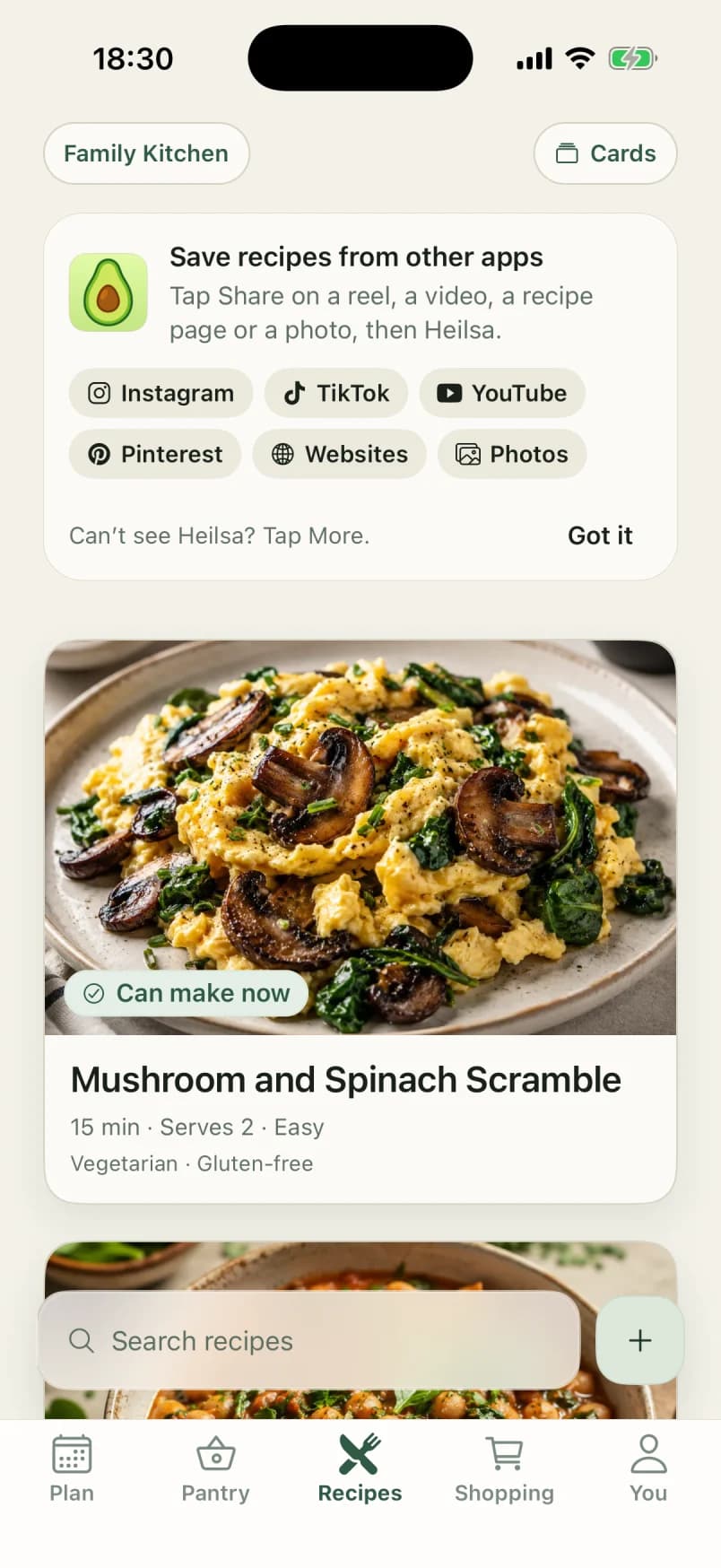
Recipes
Yours and ours, each checked against the kitchen.
- Works from the iPhone share sheet in Instagram, TikTok, YouTube, Pinterest, Safari and Photos.
- Up to three photos of a cookbook page or a handwritten card.
- Paste a link or the text of a recipe, or write it out yourself.
- Nothing joins your recipes until you have checked it.
- Shared with no signal, it waits on the phone and is read later.
From where recipes actually are
Most recipes a household cooks were never in a recipe app: a reel someone saved, a page in a cookbook, a card in a grandparent’s handwriting. Tap Share, then Heilsa, and it reads the recipe from the page, the caption, the video or the photos into ingredients, steps, timing and servings.
You check it, then it is yours
An imported recipe waits as a draft until someone in the household checks it, and keeps the name of where it came from and a link back. Once saved it behaves like any other recipe: coverage, nutrition, a picture and a place in the plan.
AI where it saves typing
Reading a recipe out of a video or a photo of a page is the typing nobody wants to do, so that is where Heilsa uses AI. It also draws a picture for a recipe that has none. There is no chatbot, and nothing it reads is saved without a person seeing it first.
The rest of Heilsa
- Pantry wallHeilsa keeps one pantry for the whole household, works out how long each food keeps, and puts what needs using first at the top.
- Meal planningPlan dinners up to fourteen days ahead in Heilsa, ranked by what needs using first, what you already have and who is eating.
- RecipesHeilsa marks every recipe Can make now, Almost there or Missing key from your pantry, with nutrition and allergens on each one.
- Shopping listHeilsa writes the shopping list from your planned dinners, minus what is already at home, and moves bought food into the shared pantry.
- What you ateHeilsa adds up what you eat at home: food groups against the Eatwell Guide, nutrition per plate, weekly goals and Apple Health.
Try it with your own kitchen
Heilsa comes to the App Store in November. Join now, through TestFlight, and your household keeps it free through 2027.
iPhone with iOS 15.1 or later, in the UK and Switzerland. Somewhere else?